Subscription cost tracker: find what each plan costs a year
Turn each subscription into a monthly equivalent and an annual cost, measure the unused share, and total the list with formulas you can check.
A subscription cost tracker needs three inputs for each service: the amount charged, the number of months that charge covers, and the share of the service you actually use. Two formulas turn those inputs into a monthly equivalent and an annual cost, and a third gives the unused cost. That puts a $15 monthly plan and a $120 yearly plan on the same basis. The subscription cost tracker on Sheet Reserve calculates all three columns. This article explains the formulas, works through an example, and shows what the totals do and do not tell you.
Key takeaways
- Divide each charge by the months it covers. A $120 yearly charge covers 12 months, so it is $10 a month.
- Multiply the monthly equivalent by 12 to get the annual cost, whatever the billing interval.
- Unused annual cost is the annual cost times one minus utilization. Utilization is a fraction, so 0.75 means 75 percent.
- The annual total is a yearly run rate. It is not a payment calendar, and it does not include future price changes.
Why compare subscriptions on one basis?
Subscriptions bill in different ways. A streaming service may charge $15 every month, a storage plan may charge $36 once a year, and a software license may charge $120 for a year paid up front. Side by side, the charges look unrelated. On a monthly basis they are $15, $3 and $10.
The comparison works the other way too. A monthly charge that looks small can add up to more than a yearly plan. Fifteen dollars a month is $180 over twelve months, which is more than the $120 yearly plan in the same example.
What columns does a subscription tracker need?
The working tab has one row per subscription, with room for 60 rows, from row 11 to row 70. Columns A to D take your entries. Columns E to G are formulas.
| Column | What goes in it | Formula in the sheet |
|---|---|---|
| A, Subscription | The service name | You type it |
| B, Payment (USD) | The amount charged in one billing period | You type it |
| C, Months covered | 1 for a monthly charge, 3 for a quarterly one, 12 for a yearly one | You type it |
| D, Utilization | The share of the period you used, as a fraction | You type it |
| E, Monthly equivalent (USD) | The payment spread over one month | =B11/C11 |
| F, Annual equivalent (USD) | The monthly equivalent over twelve months | =E11*12 |
| G, Unused annual cost (USD) | The annual cost you did not use | =F11*(1-D11) |
The total in B5 adds the annual equivalents in column F. If a row is missing a payment, months or utilization, its formulas show "Missing input" and the total shows it too. Those checks stop an incomplete row from quietly lowering the total.
How do the three formulas work?
For a monthly plan, months covered is 1. For a yearly plan, it is 12. The monthly equivalent is the payment divided by the months it covers, so $120 over 12 months is =120/12, or $10 a month.
The annual equivalent multiplies that by twelve. The unused annual cost multiplies the annual cost by the share you did not use. A $120 yearly plan used 75 percent of the time has $30 of unused cost: =120*(1-0.75).
The table below uses four example rows. The figures are recalculated from the formulas above, and the names and amounts are illustrative, not the sheet's sample data.
| Subscription | Payment | Months covered | Utilization | Monthly equivalent | Annual equivalent | Unused annual cost |
|---|---|---|---|---|---|---|
| Software license | 120 | 12 | 0.75 | 10 | 120 | 30 |
| Streaming | 15 | 1 | 1 | 15 | 180 | 0 |
| Storage | 36 | 12 | 0.5 | 3 | 36 | 18 |
| Gym | 50 | 1 | 0.4 | 50 | 600 | 360 |
| Total | 936 | 408 |
The four rows total $936 a year. Most of the unused cost, $360 of $408, sits in the gym row. That row has the largest monthly charge and the lowest estimated use. A utilization of 1 means the whole period was used, so the unused cost is zero. That says nothing about whether the service is worth its price.
How do you set up the tracker?
- List every recurring charge from your bank and card statements, including the small ones. Statements show the amounts actually charged, which is more reliable than memory.
- Enter the amount charged in each billing period, including any tax that the bill adds.
- Enter months covered: 1 for monthly, 3 for quarterly, 12 for yearly.
- Enter utilization as a fraction, or format the cell as a percentage and type 75%. Write down how you estimated it, because the sheet cannot check the estimate.
- Read the annual total in B5, then the peak and average unused cost in D5 and D6.
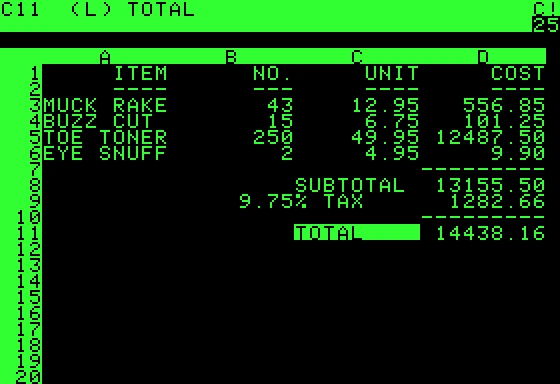
A list of subscriptions is a short table with a total at the foot. The VisiCalc screen below, from an early spreadsheet on the Apple II, has the same shape: rows of items, then a subtotal, a tax line and a total.
What does utilization measure?
Utilization is your estimate of how much of what you pay for gets used: hours a month, files opened, or days a plan was used. Choose one measure and apply it to every row, so the rows can be compared. Write the measure down next to the row.
A high unused figure is a reason to check a service, not proof that it should go. A service you use every day may still cost more than a cheaper alternative, and a service you use rarely may still matter to you. The sheet measures how much you use. Judging the value of that use is up to you.
What does the annual total leave out?
Three things. The first is price changes: a renewal can cost more than the charge you entered. The second is taxes and fees that appear on a later bill. The third is timing. The annual figure is a run rate, not a schedule of payments, so it does not show when a charge will hit your account. The sheet's assumptions state the same limit.
How do subscriptions fit a budget?
Divide the annual total by 12 to get a monthly amount for the budget. The $936 example is $78 a month. Treat that figure as a planned line, not as money left over. In a zero-based budget, assign it before the month starts. In the monthly household budget, it becomes a fixed line in the same way as rent. For the budget-versus-actual layout that line sits in, see the monthly budget spreadsheet.
Whether subscriptions count as needs or wants depends on your own rules. The 50/30/20 budget rule gives one way to sort recurring costs into groups. The budgeting templates on Sheet Reserve include the other monthly tools.
What mistakes distort a subscription tracker?
- Mixing billing intervals. A yearly charge entered with months covered set to 1 is multiplied by 12 again, so its annual figure is 12 times too high. Check column C on every row: 12 for a yearly bill, 1 for a monthly one.
- Entering list prices. Use the amount you are charged. A discounted first year, or a promotion that ends, changes the real cost.
- Ignoring shared plans. If you split a plan with someone, enter only your share. The full price overstates your cost.
- Typing totals. Every total is a formula. A typed total will not change when a row does.
- Forgetting cancelled services. A cancelled service stays in the total until its row is deleted or its payment is set to zero.
Frequently asked questions
How do I calculate the monthly cost of a yearly subscription?
Divide the yearly charge by 12. A $120 yearly charge is $10 a month. The tracker does this in column E when months covered is 12.
Should I budget with the monthly figure or the annual figure?
Use the monthly equivalent for a monthly budget line and the annual figure when you decide whether a service is worth keeping for a year. Both come from the same row, so they always agree.
What utilization should I enter?
Use an honest estimate for the same period and the same measure on every row. Write down how you estimated it, so the estimate can be repeated next year.
Does 100 percent utilization mean a subscription is worth it?
No. Utilization measures how much of the paid period you used. It does not measure the value of what you used, or whether a cheaper option would do the same job.
Why does a row show Missing input?
The row has a name but a blank or text entry in payment, months covered or utilization. Its monthly, annual and unused cells show "Missing input", and the total in B5 shows it too. Enter all three inputs as numbers.
Related reading
- Zero-based budget spreadsheet: give every dollar a job: assign each line before the month starts.
- Monthly budget spreadsheet you will keep using: budget versus actual, with a transaction log and SUMIFS.
- Debt avalanche vs snowball: months to payoff with NPER: how to order extra debt payments once recurring costs are under control.